Prepared by MAGNA Computer
Corp.
FUNDING INFORMATION FLOW
August 20, 2001
Definitions:
Fund: verb. To receive
monetary compensation secured by a Promissory Note and/or Mortgage. This also
may include selling of such notes for the value of the note or less.
Funding: noun. A set of Notes or
Mortgages that will be funded. Each funding is typically given a sequential
number.
Funder: noun entity that will
give or lend money for Fundings. Also, called lender. ( The code for the
existing funder of a deal is in the mortgage header file as mgh_type). This
is also known as Portfolio, Ownership or Lender code.
Funding Code: noun. The code of the prospective
"funder" for a "funding". The actual Ownership of the
mortgage is still listed with someone else this code represents the one you
would like to fund with. This is also known as Transmittal Code. ( (This
field is in the closing header file cls_fndcode.)
Funding date: the date the lender
has accepted a funding. The funding code is moved to the Ownership field and
the funding date is filled. After this the deal will not appear in the pending
funding report.
Note: noun a contractually
binding promise to pay money for goods or services received. Usually specifying
the amount, interest rate, monthly payment, first payment date and number of
payments to be made. In addition it should specify the maturity date, the date
the total loan amount should be paid in full.
Mortgage: a
contractually binding document that ties
indebtedness to a security ie. A piece of real property. Mortgages are
typically assigned to the lender after a funding.
Process of a funding
1. Contract is written:
1.This is the source of
fundable items. (Notes and Mortgages)
2.No funding functions are
done at this stage.
2. Recordable list prepared:
1.closing software will
prepare a list of deals to record OR
2.The closing agent will
notify the resort of closable deals
1. Prospective Funder selection:
3. each recordable or recorded deal will
be initialized in mortgages
1.Every item in a funding
must have: a contract, mortgage initialized and a closing header record.
4.possible lender (funding
code) will be assigned and funding number at initialization OR
5.Funding entry screen will
be used to modify Funding code (possible lender) and Funding number. Notes may
be entered on the contract and comments altered. Mortgage ownership field will
not typically be altered at this point.
3. Transmittal to Lender:
1.The transmittal will be
based on funding code and funding number a prepared list of deals will be
generated and submitted to the lender.
4. Acceptance of Transmittal:
1.upon acceptance of funding
number the funding date will be filled in using the Funding entry screen OR a
process that will accept fundings for a DATE by FUNDING_CODE and FUNDING NUMBER
5. Monthly Reporting if
servicing the notes:
1.Monthly Account Listing
will be used to generate the reports required for monthly reports
2.Additional support reports
may be useful for Borrowing Base Reports
Menu Functions for funding:
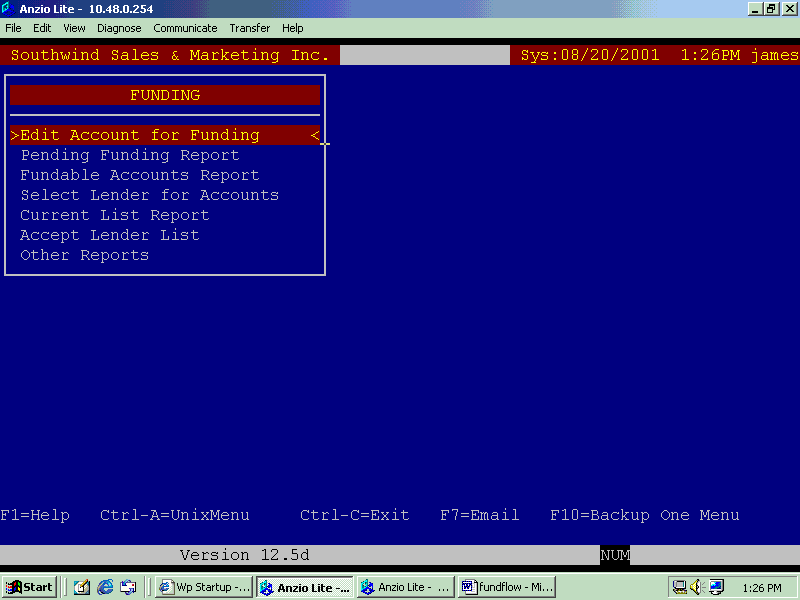
The menus for the Funding
software follow the procedures for funding. The first step is to initialize the
account for receivables as well as closings. Fundings is the bridge between
these other two modules. This is a receivables funding, that means that it
looks for contracts that have a balanced financed and then attaches a lender to
that balance. The first step is to set the account up so that a default lender
or no lender can be assigned.
Funding Main Menu:
You must have
initialization ability given by your system administrator inorder to initialize
an account. Initialization will happen if you select an account that is not
initialized. If the account has been initialized already you will be able to
edit the account if you have that permission.
The following codes will
greatly affect how the system works:
Allocation Code: This code will determine
which funder the contract will be setup with. If the funding date is blank then
this code tell the system where you intend to send the contract for funding. The
"Pending Funding Report" will subgroup contracts by this code.
Transmittal Num: The Transmittal number
will further sub group contracts on the "Pending Funding Report" into
individual fundings. The funding number is a free format fields. It is recommended
that a zero left padded number is used eg.) 00015 for funding 15 so that it may be sorted properly. This is setup
this way so that alpha numeric funding numbers may also be used. If this field
is left blank it means that it is still unknown what funding this contract will
be put on.
Credit Scores: Not yet implemented.
Closing Comments: This is the comment that is
entered from the Closing/Recording module. It may be edited here and this will
affect that comment in the Closing module.
Ownership Code: This is the code the
entity that actually owns the note for the contract in current time. This field
must be filled, even if it is just with the resort's default code. This is also
know as the portfolio code so the contract could be put into one of the resorts
other portfolios such as WH or IH to indicate a wharehouse or inhouse deal
meaning that it is unfundable.
Mortgage Comment: This comment comes from the
mortgate section and it can be edited here as well. If you edit this field here
it will change it in mortgages.
Contact History(F6): For contact history or other
on-going information about this contract press the "F6" key and view
or add notes.
Read only fields:
Close Date: This is the date
that the contract was recorded (or sent to recording) and is editable in the
Closing/Recording module.
Rec. Status: This is the
mortgage (Receivable) status code. "A" is active and all other codes
indicate that the contract is not in an active state. (S=Sold P=PaidOff
T=Transferred C=ChargedOff)
Reg Pymnt Amt: Regular monthly payment
amount as contracted currently. This may vary from the payment amount from the
time of contract.
Cur Rate: Current
interest rate. This may vary from the time of contract.
Payment Method: This is the method of
payment used for monthly payments. The most common codes are BD for Bank Draft
(ACH, PAC), CC for credit card and CP for coupon book, meaning that the payment
is received by check.